I finally decided to make my own build of the OpenGD77 firmware for the TYT MD-UV380 (or 390 in my case).
I’m growing fonder and fonder of this handheld and of this open source firmware. With the help of an agentic AI (Claude Code), I allowed myself to make a few changes to the official OpenGD77 release. Since I’m not a programmer for embedded systems like the STM32 myself, I took care to make one very small change at a time and to test it on its own before moving on to the next.
The changes cover four different topics, and I took the opportunity to fix a small, harmless bug in the official release.
I started from the latest sources published on OpenGD77.eu. To update the radio, I used the very handy Browser CPS from grid.radio, which has the advantage of being cross-platform and of including the MD9600 firmware to inject the AMBE codec when flashing the radio (don’t forget to select it if you want to use DMR).
My radio is precisely the TYT MD-UV390 Plus 10W GPS, but like other users, I find that the official firmware meant for this version doesn’t really work on my radio (black screen, a problem documented on the forums). So I use the base version, and to get the 10 W, you have to go to Options → Radio Options → Mode.
My binary is available on my forge. It is published (along with its sources) under the same license as the official firmware by Roger Clark VK3KYY and his team, so no commercial use. As usual, flash it at your own risk!
Note: SK1 is the button above the PTT button, SK2 is the button below the PTT button.
Channel screen
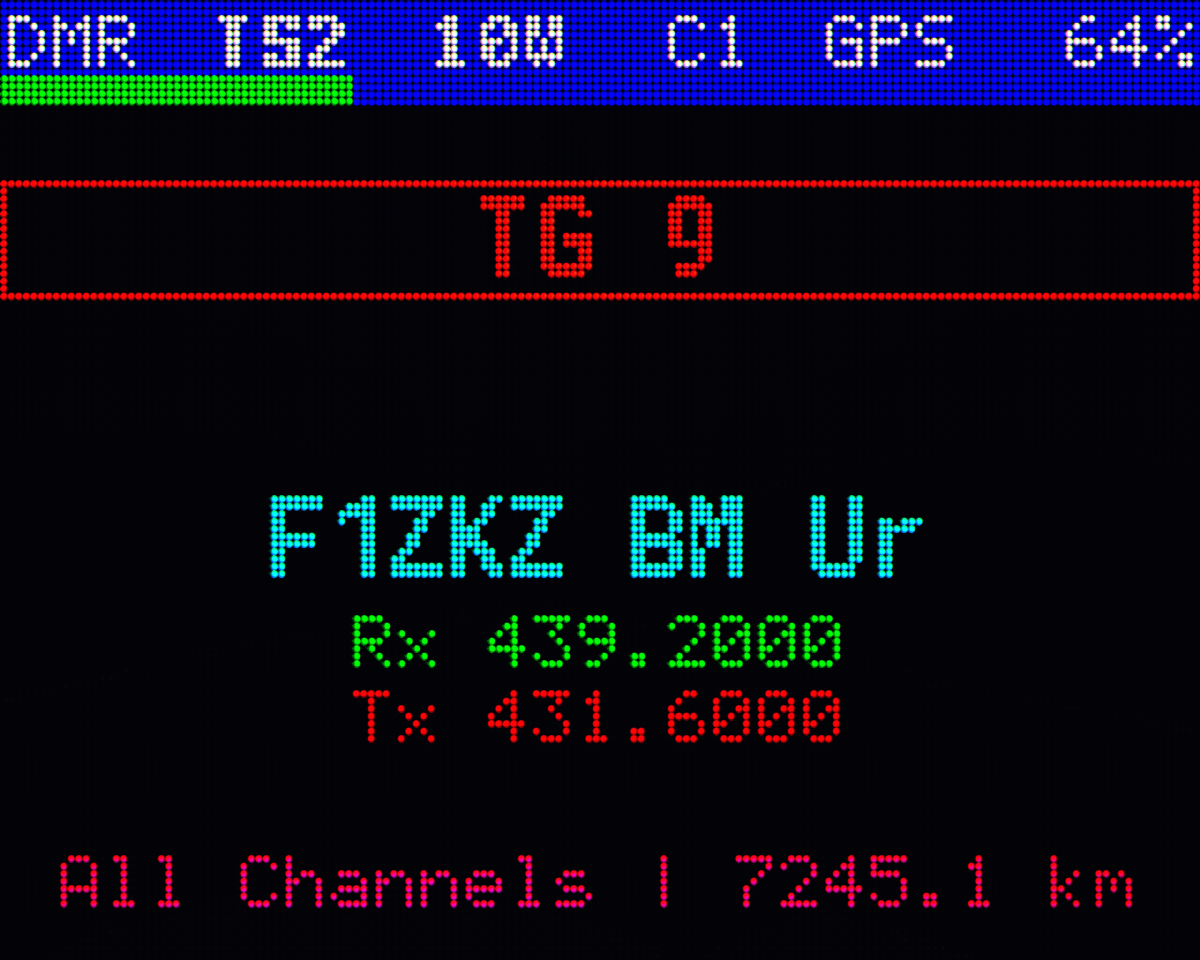
With the official firmware, the information shown by default is brief, and you have to hold SK1 to get more. Since there is room above and below the channel name, it now shows the Rx and Tx frequencies, the CTCSS/DCS (on FM), and the APRS setting. I tried to make something both compact and complete. If the transmit frequency is the same as the receive frequency, only one is shown, unless the CTCSS/DCS differs. The APRS line shows the callsign, the SSID and the name of the preset along with its state (paused, off, etc.), only if an APRS preset is assigned to the channel; otherwise nothing is shown. APRS is above the channel name, the frequencies below. The colors follow those of the theme.
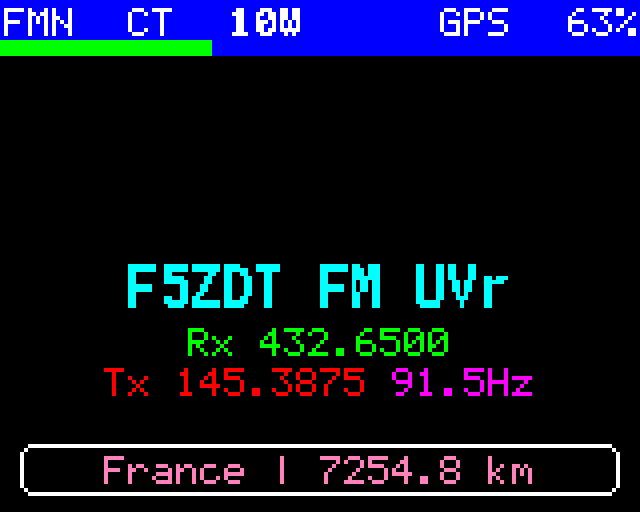
The F5ZDT cross-band FM repeater: receive on 70 cm, transmit on 2 m with a 91.5 Hz CTCSS, shown in its own color
One last detail: an empty distance (— km) is no longer shown when the channel has no location.
APRS
Something that bothers me a little in the official firmware: if a channel is assigned an APRS preset in automatic or SmartBeaconing mode, it transmits as soon as you land on that channel, even when you’re just scrolling through the channels of a zone. When the GPS receiver hasn’t had time to get a fix at the current position, you send an old, probably wrong, position over the air. Now, APRS transmission is paused by default. To start it: SK1+1. And the screen now clearly shows the APRS state (see the previous section).
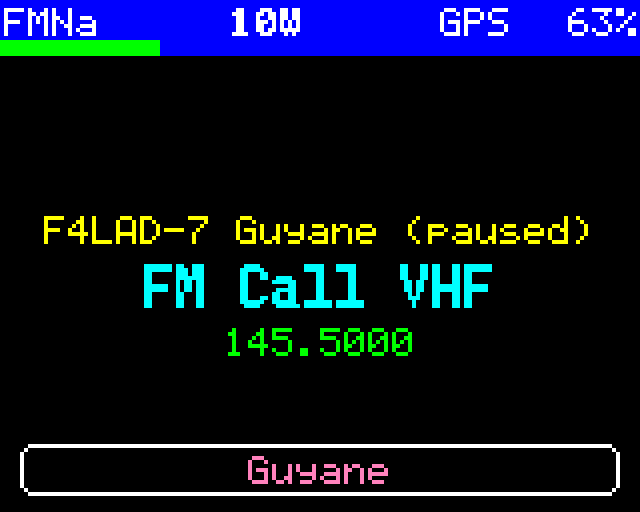
The VHF FM calling channel with an APRS preset, paused, above the name. Same transmit and receive frequency, no CTCSS: a single line. Channel without a location: no empty distance in the zone line
Satellites
I like listening to QSOs and trying to communicate over APRS through satellites (ISS and Sonate-2), but I had to lower the squelch every time to hear anything. Now, the squelch is open as soon as you enter the satellite module. You can raise its level, and the setting stays for the following passes. It goes back to open the next time you enter the module, whatever its general setting (outside satellites).
For satellites with no voice frequency programmed, transmit and receive happen directly on the APRS frequency, without having to select it manually. In fact, more generally, if the chosen slot is empty, the first configured slot is used. There are three slots: voice, APRS and other (usually a Morse beacon, but I put the SSTV frequency for the ISS, for example).
One last change: the receiver is now turned off on the upcoming passes list screen (so the PTT does nothing on that screen).
Battery management
This project is explained in more detail in the previous post, but in short, the battery discharge measurement (as a percentage) is more accurate, at least for my radio and my battery.
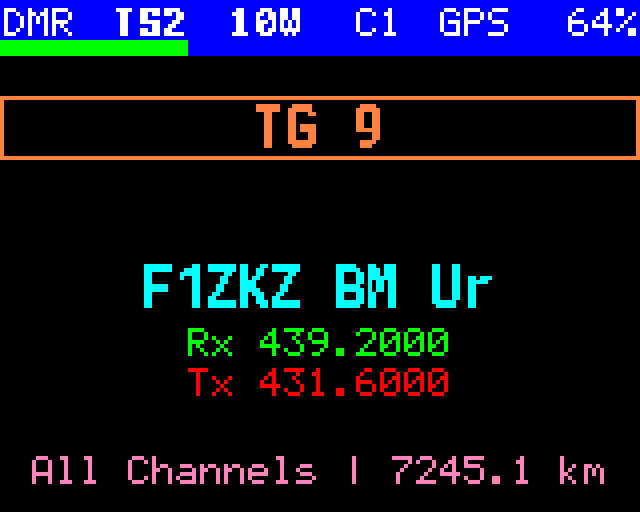
The F1ZKZ DMR repeater (Brandmeister): Rx and Tx frequencies, distance in the zone line, and at the top right the battery percentage (64 %) computed with the measured table
Bug fix
After power-on, the first APRS packet had no sidetone: the only way to know it was being sent was the red LED lighting up. This is now fixed, the sound is audible.